VolleyDeep Get in touch

For volleyball coaching staff

Every ball you scout becomes an answer for your staff.

VolleyDeep is Windows software for scouting the match, linking every action to the video and turning it all into analysis. Your staff gets it on the scout’s PC, on a tablet at the bench during the set, and on the players’ phones.

Windows 10 and 11 · .dvw files · automatic updates

Set distribution

Setter #7 · after # and + reception

Sample data
Net
158 sets overall efficiency 46% Tap a zone to see who attacks.

Zone 4 · 61 sets

  • #9 · outside38 attackseff. 50%
  • #15 · outside19 attackseff. 42%
  • #2 · opposite4 attackseff. 25%
  • .dvwOpens and writes .dvw files, the standard format for volleyball scouting.
  • VideoEvery scouted action comes with its own video clip.
  • BenchCourt, set distribution and live video on a tablet.
  • TeamA website for your players, with reminders on their phones.

What it does

A week with VolleyDeep

From studying the opponent to the clips that land on every player’s phone, it all starts from the same scout. Whatever you enter during the match shows up in the analysis, at the bench and in the match report, without copying anything anywhere.

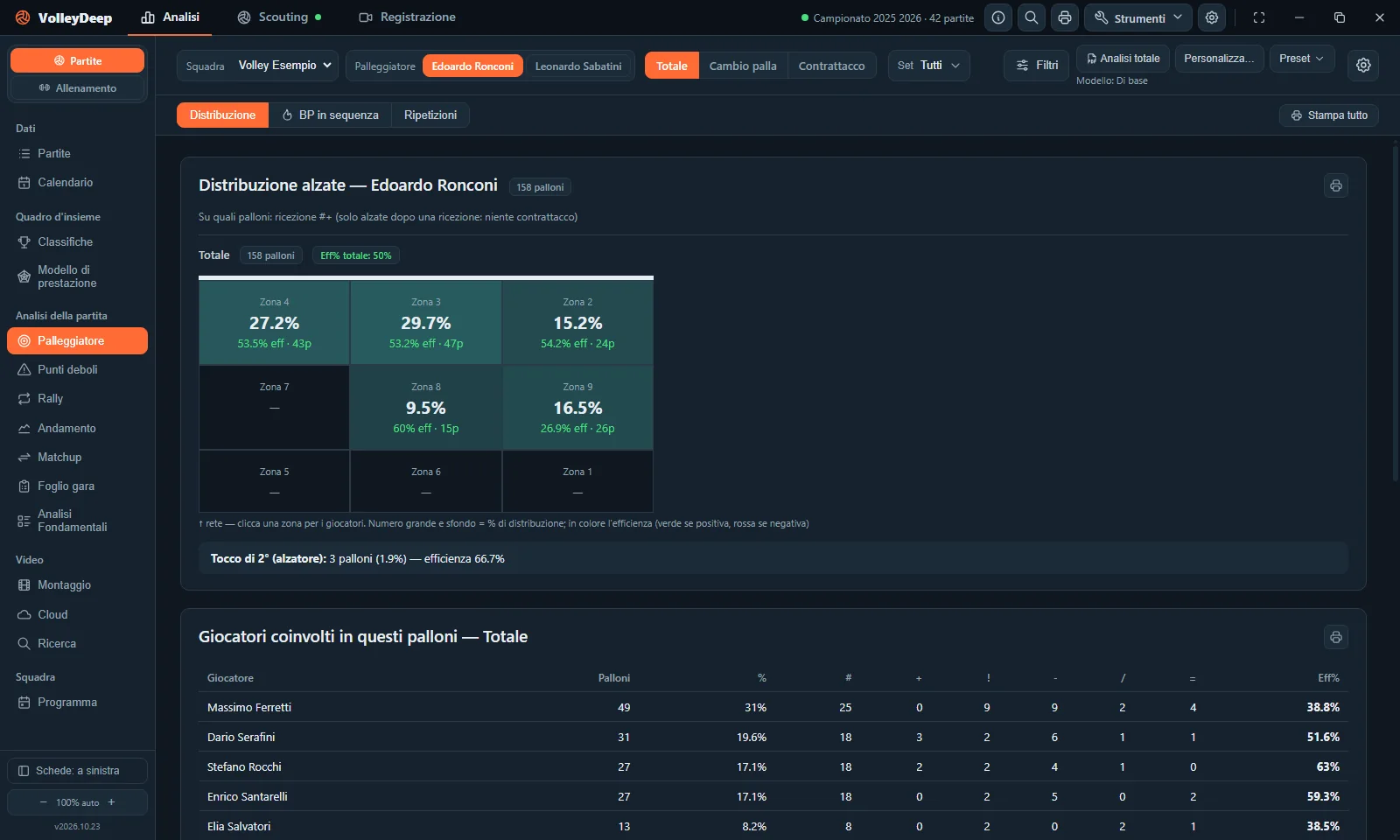
The VolleyDeep window on the Setter tab: set distribution zone by zone and the players involved
The VolleyDeep window, Setter tab. The program is in Italian, so the screenshots are too. All teams and players shown are made up.
Before the match

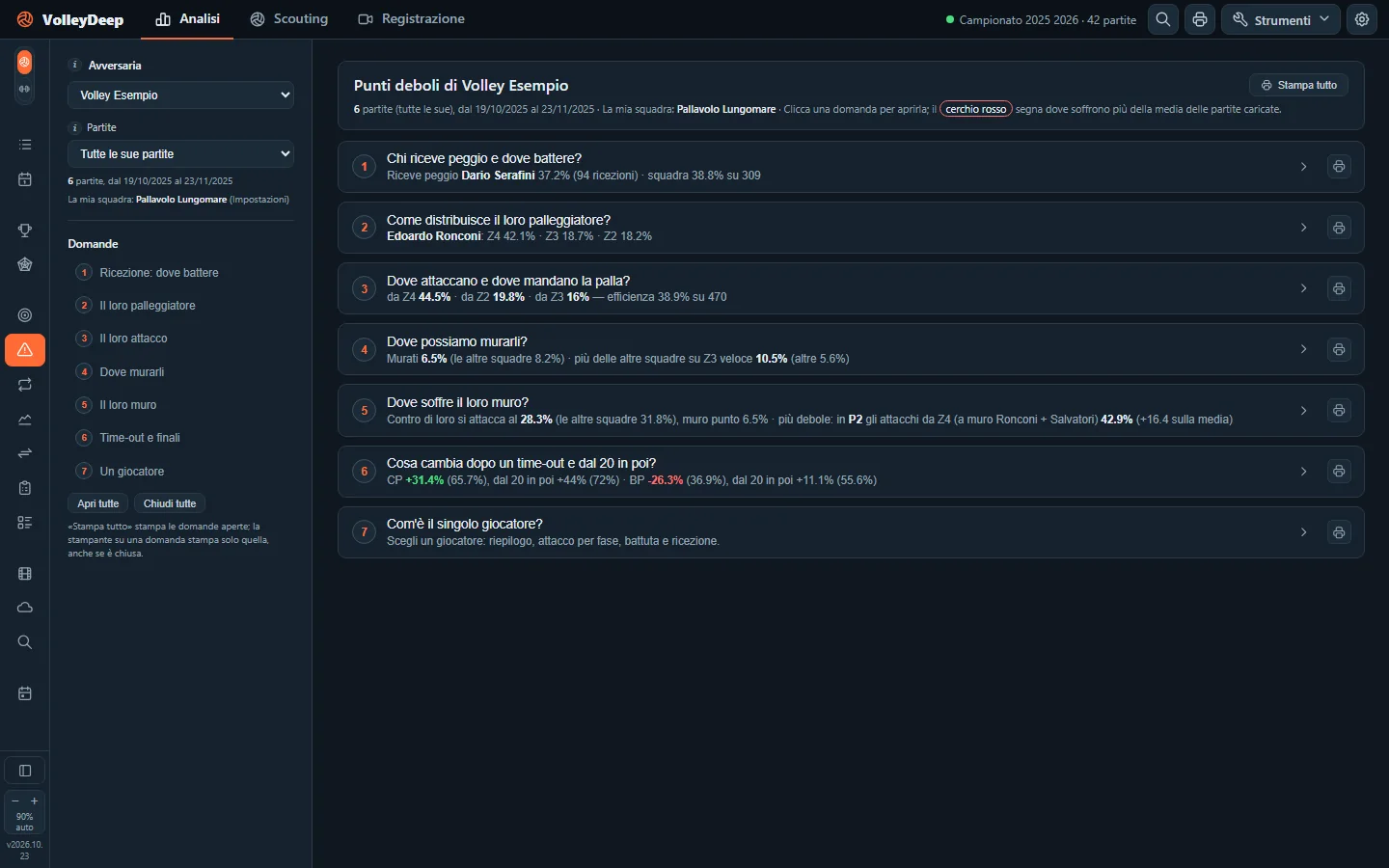
Study the opponent through clear questions

Load their matches and VolleyDeep answers the questions your staff really asks: who struggles most in reception, where their setter goes, where you can block them, what changes after a time-out. Then print the match sheet for the bench.

  • Weak spots
  • Matchup
  • Setter
  • Match sheet
The Weak spots tab in VolleyDeep: seven questions about the opponent, each answered in one line
Weak spots: seven questions about the opponent, each with its answer already written out.
During the match

Scout with video while the bench sees it all

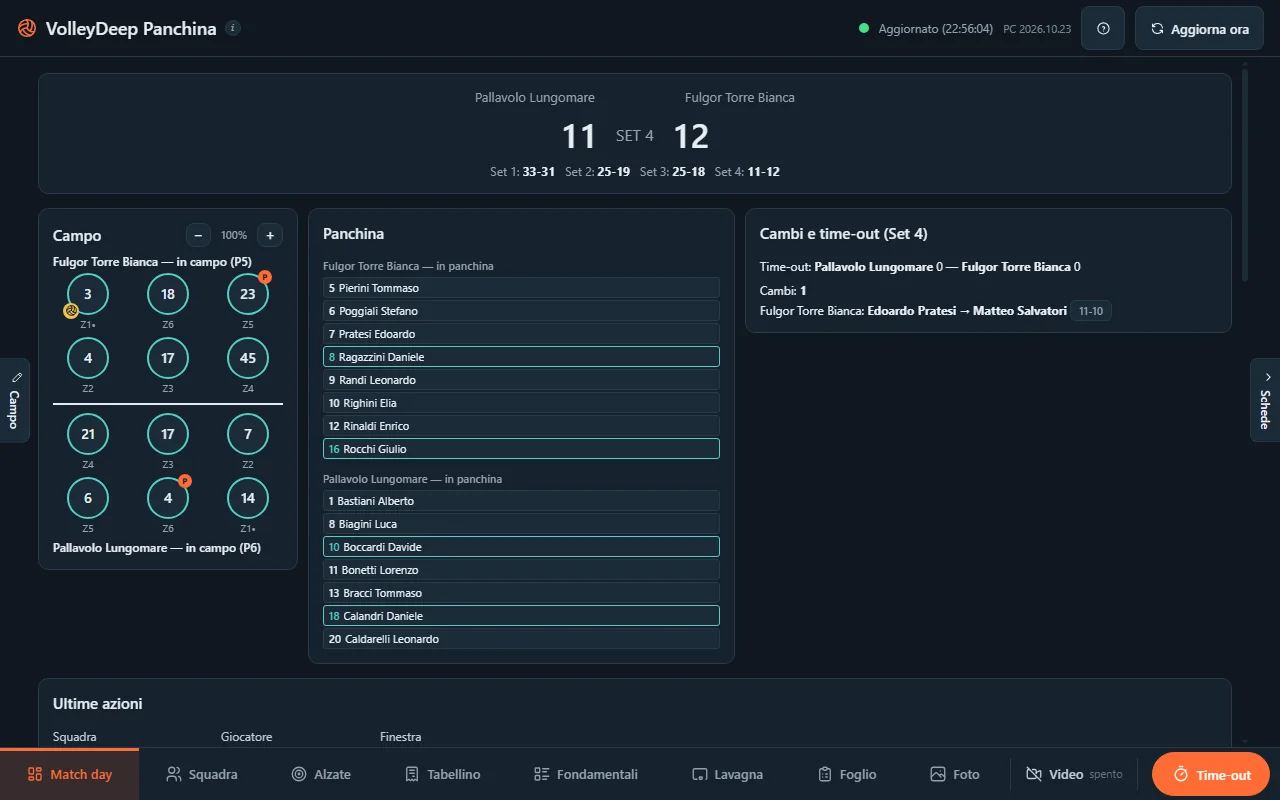
Type your codes on the keyboard, the way you’re used to. The recording PC films the match and keeps it in sync with the scout. At the bench, on a tablet, the coach sees the court and rotations, the latest rallies, the set distribution and live video with instant replay.

  • Scouting
  • Recording
  • Bench
  • Whiteboard
VolleyDeep Bench: score, court with rotations, benches and substitutions for the current set
The bench view on a tablet: score, court and rotations, substitutions and time-outs for the set.
After the match

Match report, box score and clips ready to go

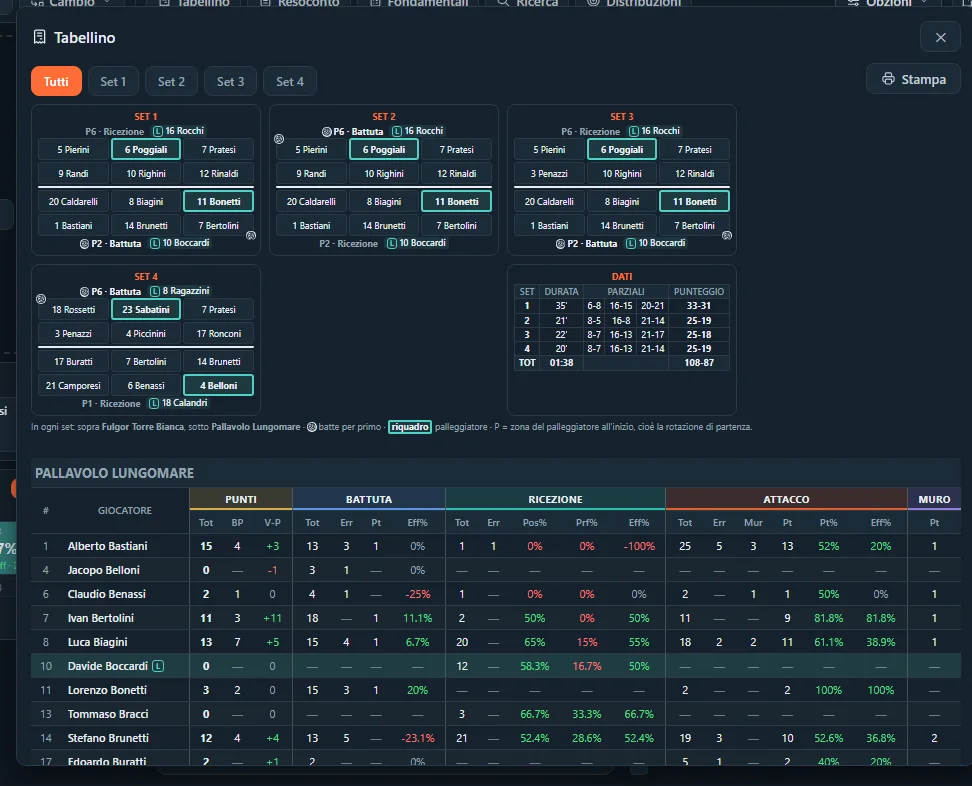
When the match ends you already have the box score, the key moments, and side-out and break-point by rotation. Put together a clip reel for one player or one skill and upload it to the team cloud.

  • Match report
  • Skills
  • Rally
  • Clip reels
  • Cloud
The VolleyDeep box score: lineups for each set, set scores and player stats by skill
The box score: lineups for each set, set scores and every player’s numbers.
During the week

Players get the schedule and their video

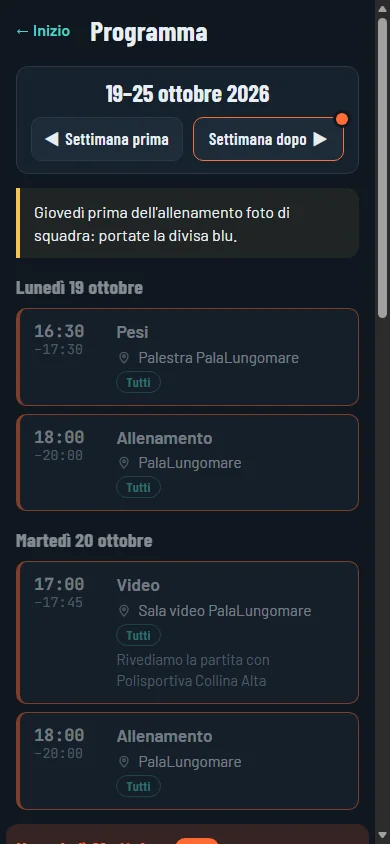
Write the week’s schedule and players get a reminder on their phone, with a button to confirm, so you can see who has read it. On the team website everyone finds their own actions on video, the match calendar and the standings. Training sessions can be scouted and analyzed too.

  • Weekly plan
  • Calendar
  • Training
  • Team website
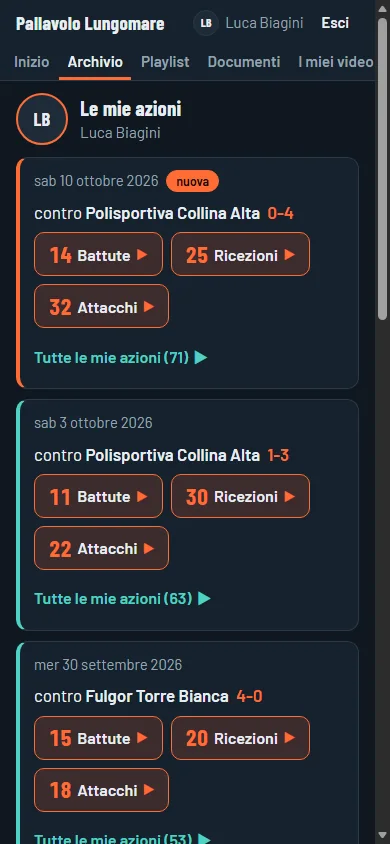
The team website on a phone: the week’s schedule with times and places The team website on a phone: a player’s own actions, with serves, receptions and attacks from every match
On a player’s phone: the week’s schedule and their own actions on video.

In the gym

Who uses VolleyDeep, and where

Each license is for one club and covers several workstations. Every PC has its own key, and all the keys arrive in the same email.

  • PC

    Scout’s PC

    The main PC: live scouting, video, analysis and printouts. It shares matches and training sessions with the staff’s viewer PCs.

  • PC

    Recording PC

    Records the match from the camera and streams it live to the scout and the bench. Only the Recording tab opens on this PC.

  • PC

    Viewers

    The other staff members’ PCs: they can view and print the matches and analyses shared by the main PC, without changing them.

  • Tablet

    Bench

    A tablet or phone on the gym’s network: court and rotations, set distribution, box score, whiteboard and live video.

  • Phone

    Players

    The team website, with no app to install: the week’s schedule with reminders, match calendar, standings and their own actions on video.Included in the Complete package.

Packages

Two packages for different teams

Both include scouting with video and the live bench view. Complete adds the analysis for match preparation, training sessions and the team cloud.

What’s included Completethe whole program Slimscouting, video and core analysis
Workstations
Scout’s PC11
Viewer PCs for the staff21
Recording PC11
Match
Live scouting with video✓✓
Live bench view✓✓
Box score✓✓
Full match report✓—
Analysis
Skills, Rankings, Calendar, Setter✓✓
Performance model✓chart only
Weak spots, Matchup, Rally, Trends✓—
Match sheet✓—
Video and team
Video clip reels✓✓
Training: scouting and analysis✓—
Cloud and weekly plan✓—
Tools
Search across matches✓✓
Automatic custom codes✓—

Need more viewer PCs or a second recording PC? They can be added to the same license.

FAQ

Before you try it

Can I use my DataVolley files?

Yes. VolleyDeep opens .dvw files and saves matches in the same format, so you can load past seasons and keep exchanging files with other teams.

Do I need internet at the gym?

Not for scouting. The license is checked online and then stays valid for 7 days without a connection. The bench and the recording PC use the gym’s local network: a router is all you need, even without internet.

Which computers does it run on?

Windows 10 and 11. The bench view runs on a tablet or phone on the same network, with the Android app or in a web browser.

How do updates work?

From inside the program: when a new version is out, VolleyDeep lets you know, downloads it and restarts already updated.

Do players need to install anything?

No. The team website opens on their phone and can be added to the home screen. Reminders work on Android and on iPhone (iOS 16.4 or later).

What language is the program in?

Italian, and so are the screenshots on this page. The scouting codes are the standard .dvw ones, which stay the same in any language, and player names can be written in any alphabet: with ö, ü or č, or in Cyrillic, for example.

Want to see it on one of your team’s matches?

For more information, or to see VolleyDeep up close, write to us and we’ll get back to you. We reply in English and Italian.